
Your own dojo, and a day job
You run a dojo and work full time. Keiko keeps up between classes.
Members book, cancel and pay on their own page. Instructors check their class on their phones. At lunch, you look at one screen that shows only what needs you.
Free to start, no card. Nothing reaches your members until you go live.
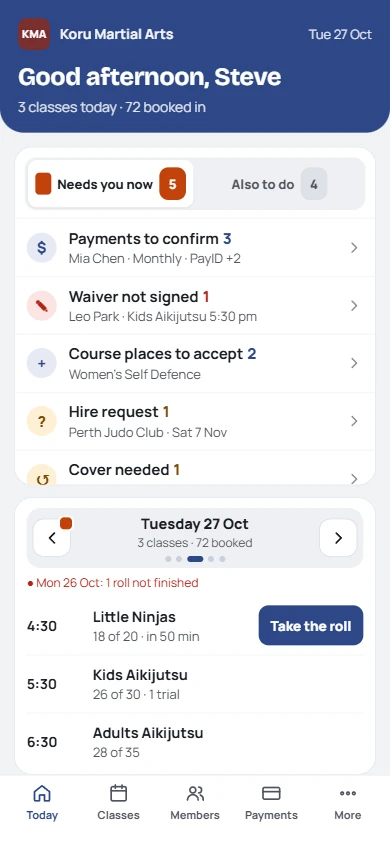
Today, at lunch: only what needs you
For dojos like yours
- Your own space, with rent to cover and classes to fill
- One or two instructors, often volunteers or senior students
- Evenings and Saturdays, with the admin squeezed in around a day job
- Kids, teens and adults, families, belts, a beginner course or a seminar now and then
Probably not for you if
- You need a check-in kiosk or text reminders. Keiko uses your members' own page and email.
- You mainly teach one to one.
- You want us to hold your members' money. Fees go straight into your account. We never touch them, and never take a cut.
Private lessons are KeikoForMe's job: keikoforme.com. And if your current system does all of this and you like it, keep it.
What changes for you
The dojo keeps running while you're at work.
They book, cancel, say they're away, see what they owe and tap I've paid, on their own page. Fewer "is class on tonight?" messages.
Before class, their phone shows who's coming, injuries and medical notes, who's not in photos, and any notice for the class. A PIN, no account, no access to money.
Today shows what needs you: payments to confirm, waivers to chase, people coming to watch. Most days it's nearly empty.
A page for your dojo, each program and your instructors, built for Google. Visitors book to watch or a free class without phoning you.
Weekly, fortnightly or monthly. Members set up an automatic payment from their own bank with their reference, and Keiko expects it on the day. Overdue? Bookings wait until they pay.
Classes since the last grading add up from the roll, so you can see who's ready before you plan a grading.
One scenario
A newcomer's first month, without you answering messages.
From your dojo page to their first payment: what Keiko does, and the two taps that are yours.
- KeikoSunday night
Ella's mum finds you on Google and books Kids on Tuesday to watch. She gets the time, the address and what to bring.
- KeikoTuesday, watching
Ella is on the roll as watching. Next morning, a thank-you with a free class to try.
- KeikoThursday, free class
Booked from the email. Her mum signs the waiver on her phone before they arrive.
- You · 1 tapSaturday, she joins
She chooses Kids monthly. You see it on Today and welcome her. Her page arrives by text.
- You · 1 tapWeek 4, first payment
Her mum pays US$95 by bank transfer and taps I've paid. You tap Arrived at lunch.
What your members see
Their page, working like your dojo's own app.
It arrives as a link by text, WhatsApp or email and saves to their home screen with your logo. Nothing to download, nothing extra to pay.
- Book and cancel classes, inside your cancel window
- I'm away for holidays, so you're not left wondering
- Their belt and how far they are towards the next one
- What they owe, how to pay you, and I've paid
- Parents switch between their children on one page
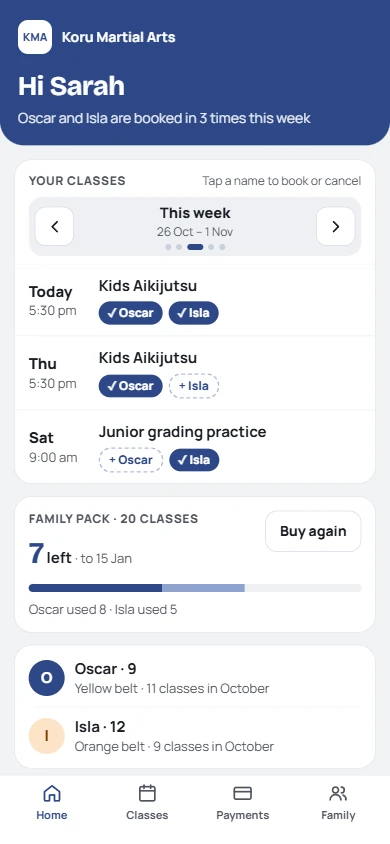
A parent of two
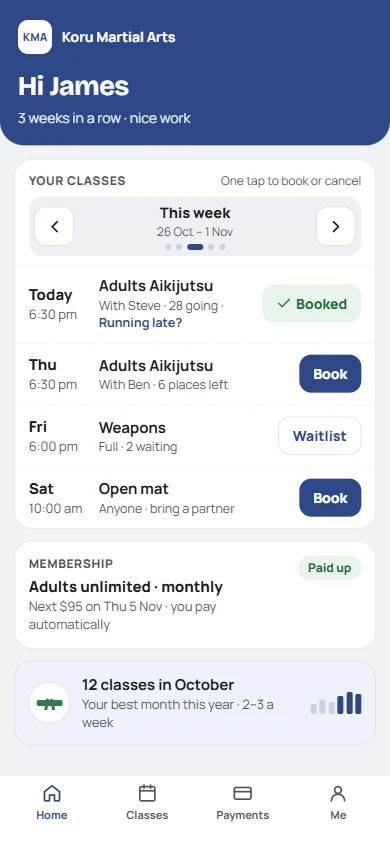
An adult member
What moving takes
A weekend to set up. Two to four weeks to go live, gradually.
Nothing is emailed and nobody can book until you say so. You can go live with one class first.
Try the sample dojo. Add your programs and timetable, then bring your members across.
Send each instructor their link and PIN. They take a practice roll.
Send pages to two or three families you trust. Fix anything they notice.
Everyone gets their page. Your first month of payments comes through Keiko.
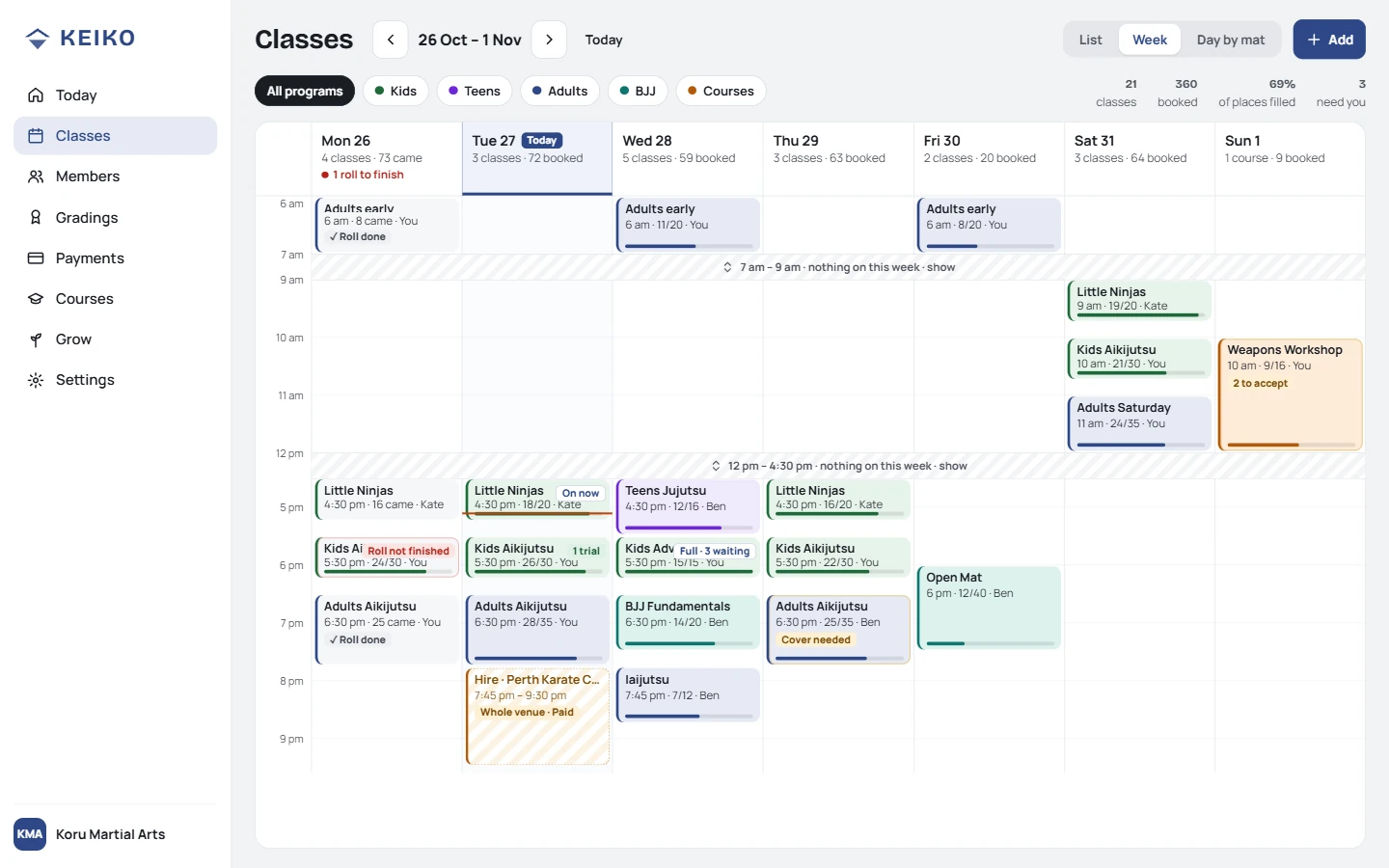
Set up once, at your desk: the week
Not ready to move? Start with your next workshop instead ›
What you bring across
Your members, their families, belts and balances.
From a spreadsheet or your current software's export. It doesn't matter whether you have 30 members or 300.
It already has your plans, programs and belts, with drop-downs.
Our AI prompt reshapes your old system's export to fit. Not right? Edit the prompt and run it again. Leave medical notes out and add them in Keiko.
Every row is checked before anything changes. People come in as drafts: no emails until you activate them.
Abandon the import and everything it added is removed.
Or start smaller
Try Keiko with your next workshop.
Keep your website, your membership system and your payment provider. We're not asking you to change any of them.
The workshop gets its own page, registrations, waivers, reminder emails and a roll. People pay through your own payment link, straight to you.
Want to run it again? It's already done.
Add new dates and the same page is taking bookings, at the same link you've already shared. Anyone who asked to hear about the next one is emailed for you.
Free for your first two runs, up to 20 places each.
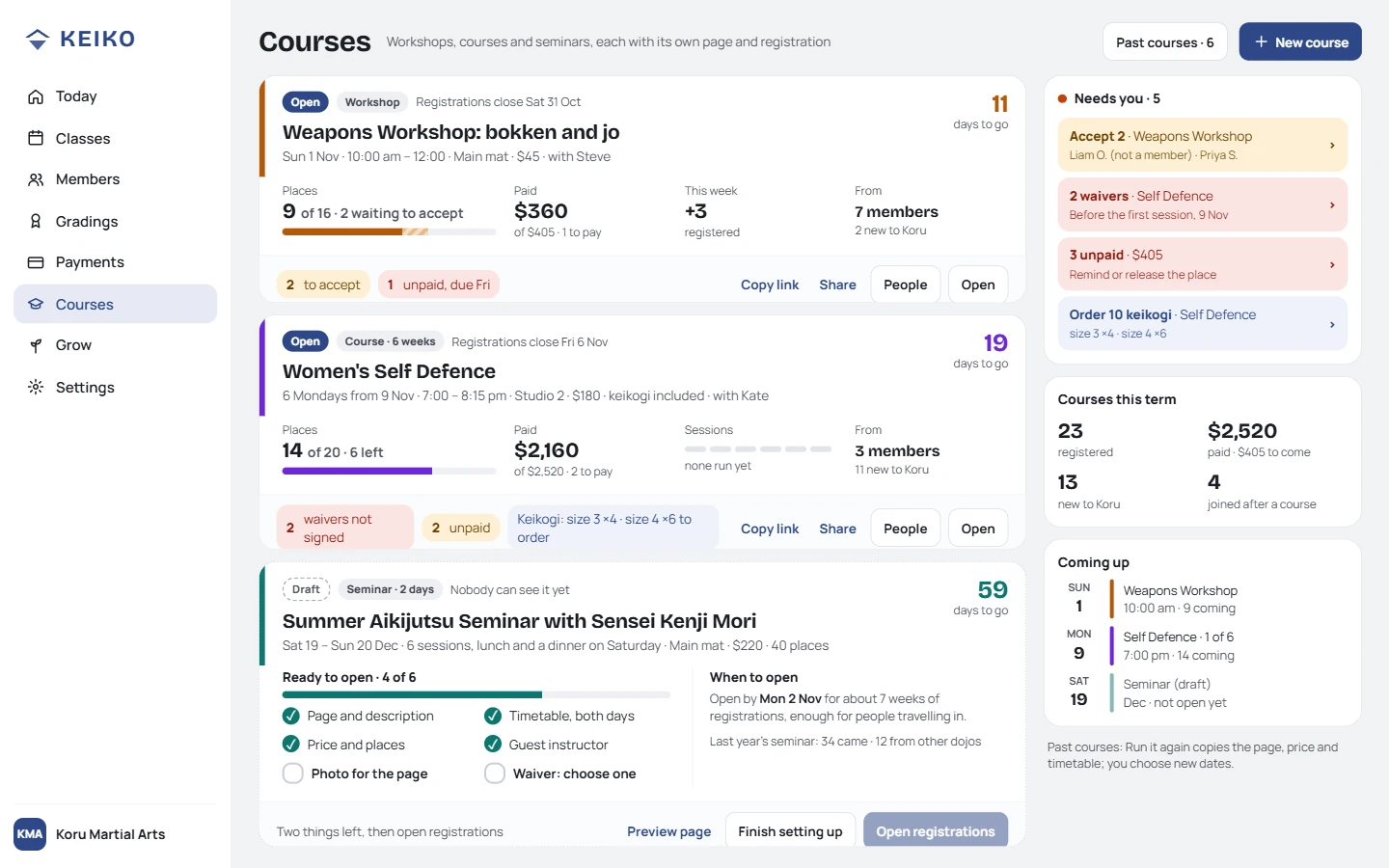
Each workshop: who's registered, signed and paid
What it costs
Most dojos like yours are on Club.
Every feature on every plan; you pay for your number of active members. Parents who only pay don't count. Prices include any GST or VAT we charge.
Free
US$0
Up to 15 active members
While you set up, or if you're small
ClubDojos like yours
US$35a month
16 to 49 active members
or US$350 a year (2 months free)
Academy
US$59a month
50+ active members
or US$590 a year (2 months free)
0% of your fees. Members pay you directly. Leaving? Export everything any time; stop paying and you drop back to Free, nothing deleted. Full pricing ›
How you'll know it's working
After a month, you'll notice:
You arrive, teach and go home. The roll is done when class ends.
Most days it's a payment or two to confirm, at lunch.
They check who's coming and the medical notes without asking you.
Questions
What dojo owners ask us.
- How long does the move really take?
- A weekend to import and check, then two to four weeks going live a few members at a time. Nothing reaches members until you're ready.
- Do my instructors need accounts?
- No. They use their member link with a PIN, which opens Teach: their classes and who's coming, with no access to money.
- Can I go live gradually?
- Yes. Members come in as drafts and you activate them when you're ready, one family or one program at a time.
- What about direct debit?
- You don't need it. Members on a weekly, fortnightly or monthly membership set up an automatic payment from their own bank, with their reference. Keiko knows when each one is due and marks payers you trust as paid on the day. No collection fees.
- How do members pay?
- Straight to you: bank transfer, PayID or your own Stripe, Square or PayPal link. They tap I've paid; you confirm. We take 0%.
- Can I run it alongside my current system?
- Yes. Many start with one workshop on Keiko and keep everything else where it is.
If this sounds like your week, it might be worth a look.
If not, you've probably got it sorted. Free to start, no card needed.
Not quite you? I hire a hall or train at home › · My dojo is my business ›